
Google Raises the Curtain on Android Updates Ahead of Google I/O
As has become customary, Google presented some information about the latest Android updates ahead of its annual Google I/O event on 19 May. Unsurprisingly, AI was a central part of the story.
Google kicked off the event talking about how Android is transitioned from being an “operating system” to an “intelligence system”. This is consistent with previous messaging from Google and partners such as Samsung, including comments such as “AI is the new UI” regarding the experience on smartphones and other connected devices. In that context, it was notable how often Google referred to both Samsung and Pixel products, underscoring Samsung’s dominant role in the wider Android ecosystem and its importance as a partner to Google.
It made me smile to see Google use Gemini Intelligence as both the name and a descriptor for how it’s adding what it calls a “proactive intelligence system” to Android devices, starting with Samsung Galaxy and Google Pixel products in the coming months. It won’t escape people’s attention that a rival company uses the term Apple Intelligence. It’s just a name, but it’s a bit of a statement.
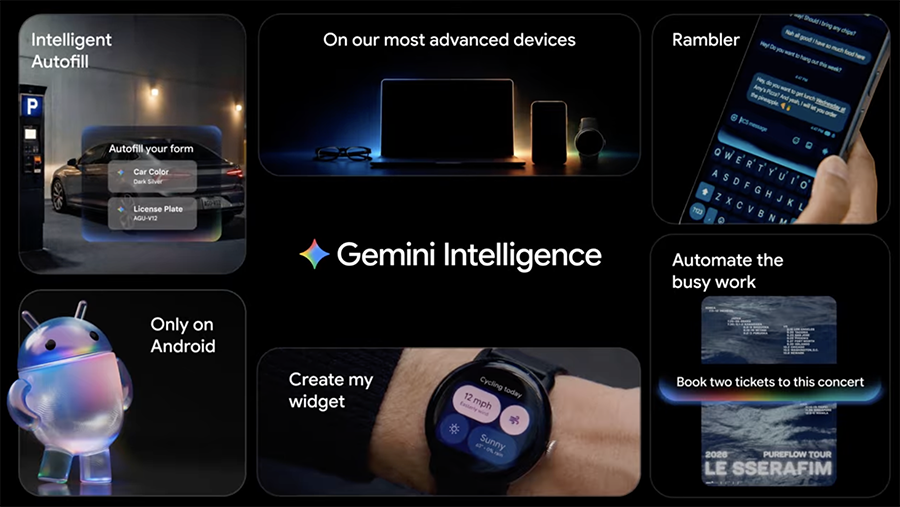
Deeper integration of Gemini in products such as phones, watches and cars makes perfect sense given the strategic importance of Gemini AI to Google. Android-powered devices offer the broadest distribution platform for Google’s AI, putting it in the hands of billions of users.
This is manifesting in numerous ways, including the Material 3 Expressive user interface, which embeds Gemini Intelligence even more deeply into the Android experience, and new levels of automation in apps and the Google Chrome browser.
For example, app automation allows Gemini to complete tasks in apps for the user, such as booking a fitness class, making a reservation or doing some shopping based on criteria defined by the user. It isn’t a new capability, but Google seems to have significantly improved it over previous generations.
Furthermore, it presented intelligent autofill capabilities. The tool can retrieve data from your phone, such as a picture of your passport in the Photos app, and use it to complete a task, like booking a flight. It can also help fill out other complex forms, such as an insurance claim. These sound impressive, but I worry they could raise privacy or liability concerns for some users.
A particularly interesting development is the ability to generate custom widgets using natural language prompts. Being able to keep all the information related to a particular activity, hobby, vacation or similar in one place could be extremely useful. However, it’ll ultimately come down to how well the device can interpret voice prompts and deliver relevant data. Additionally, as with many of the new features outlined in the video, it depends on users living almost entirely in the Google ecosystem.
Google also introduced Rambler as part of the Gboard virtual keyboard on Android devices. This allows users to use free-form “rambling” speech, including filler words and corrections, and converts it into clear, concise text for inclusion in a message, email or similar. This could encourage more people to interact with their devices using voice rather than text.
A hot topic in the tech world is digital well-being. Almost all brands are seeking ways to help people manage their device use, particularly on smartphones. It has become a common theme in a world where endless doomscrolling has become a perennial time-waster for many users, as well as serious concerns about mental health and anxiety.
Like others, Google is trying to address this, and its latest initiative is called Pause Point. This allows users to set a 10-second delay when opening what Google terms “distracting” apps, to help users break “autopilot scrolling habits”. This seems like a sensible idea, and as someone who’s regularly guilty of this behaviour, I look forward to trying it. Pause Point can also be configured to recommend alternative apps that might be more productive.
Another area that has been a major focus for Google and the wider Android-powered device community is reducing the friction for users switching between Apple iOS and Android products. A good recent example of this is the ability to use Quickshare to transfer content between an Apple device and certain Android smartphones. Google announced support for a broader set of premium smartphones, and we expect this list to continue growing over time. It has also overhauled the switching process between iOS and Android.
Although commendable, this remains a major barrier to adoption of Android devices. Google must work hard to articulate this to consumers, who are usually extremely reluctant to move away from an Apple device, with data transfer a frequently cited barrier.
The livestream wrapped up with the announcement of Googlebook. There had been a lot of anticipation that the company would announce something in this vein: an operating system, which had previously been referred to as Aluminium OS, has been the topic of rumours since early 2026.
Googlebook is a new category of laptops that brings together ChromeOS and Android, described as being “designed for Gemini Intelligence from the ground up”. This is regarded as a controversial move by some, given the work done to position ChromeOS as a highly functional and secure laptop operating system. Android is a mass-market operating system for smartphones in all price tiers, and the risk is that it could dilute Google’s laptop product category.
The counterargument is that it gives users a clearer view of how their smartphones will work seamlessly with their laptops, and they’ll get all the benefits they currently have on an Android device. Google indicated it already has support for products from Acer, Asus, Dell, HP and Lenovo later in the year. The product category is also supported by MediaTek, Qualcomm and Intel, which suggests that Google is neither nailing its colours to the Arm nor the x86 ecosystem.
The integration of Google Gemini in Google is centred around Magic Pointer. Essentially, this refers to when a user wiggles the cursor to get contextual suggestions, highlighting content that Gemini can interact with and provide an outcome. For example, an image can be easily created by selecting three photos of different items and asking Gemini to mash them together. This could allow users to see what new clothes might look like on a person or visualize items of furniture in a room.
It’s becoming harder for device-makers to market their products, so new releases like these are extremely important for generating consumer interest. It’ll be interesting to see how these updates are shared at Google I/O next week. We’ll be following the event closely and will publish a report with our findings for clients.

 LinkedIn
 Email
Email
 Facebook
 X
X